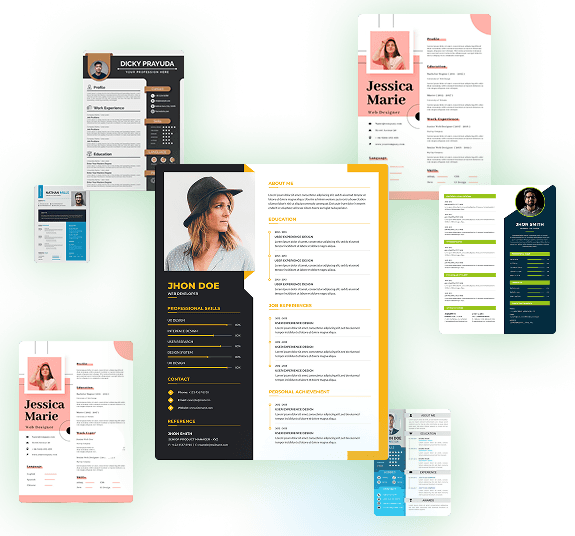
Our Most Popular Resume Formats
Here at LetsMakeCV, we have an extensive selection of resume format templates to choose from. So, whether you’re applying for roles in education or retail, we’ve got you covered. We offer five primary resume formats, and each one possesses its own unique benefits. We’ve recommended an option for every imaginable job and employment sector.
Chronological Resume Format
Best for: Experienced professionals with steady work history
- Lists work experience in reverse-chronological order
- Focuses on roles, responsibilities, and accomplishments
- Preferred by recruiters in most industries
- ATS-friendly and widely accepted
Suitable industries:- Corporate jobs, finance, marketing, IT, HR, sales
Functional Resume Format
Best for: Career changers, freelancers, freshers
- Emphasizes skills and competencies over job history
- De-emphasizes dates and employment gaps
- Highlights achievements grouped by skill area
Suitable industries:- Graphic design, career switchers, creative roles
Combination (Hybrid) Resume Format
Best for: Professionals with both strong skills & experience
- Blends functional and chronological formats
- Showcases skills at the top, followed by work experience
- Great for mid-level and multi-domain professionals
Suitable industries:- Consultants, senior managers, tech professionals
Targeted Resume Format
Best for: Job seekers tailoring each resume to a specific role
- Highly customized to a particular job description
- Focuses on role-specific keywords and achievements
- Works well when applying to competitive or niche roles
Suitable industries:- Startups, product roles, competitive job markets
Mini Resume Format
Best for: Networking events, quick intros, business cards
- Short, one-paragraph version of your resume
- Summarizes key skills, education, and job titles
- Used as an add-on or for cold emailing
Suitable industries:- Freelancers, consultants, startup networking
What’s the Best Resume Format for My Needs?
Look at a sample resume format from our library, and you’ll see it’s designed specifically for a particular outcome or industry. There’s no right or wrong here, but selecting the right resume format template could be the difference between an ATS blockade and an interview! Depending on your focus area, choose the resume template best suited to delivering a successful outcome.
Work History
A work history-focused template spotlights your career timeline and achievements. Ideal for pros with solid experience, it organizes roles clearly, impressing recruiters with your track record. However, it may downplay skills for freshers or career switchers.
Skills and Abilities
A skills-first template highlights your core strengths and competencies. Perfect for new grads or freelancers, it puts abilities front and center, grabbing recruiter attention fast. ATS-optimized, it’s great for keyword-heavy roles but may feel light if your work history is your biggest focus.
Skills and Experience
A balanced skills-and-experience resume template is great for professionals with a versatile set of traits. It blends your expertise with key achievements, which suits most roles and industries. ATS-ready and recruiter-friendly, it showcases your full range of skills, experiences, and certifications. However, it might not dive deep enough for highly specialized or senior roles.
Job-Specific Traits
A job-specific traits template targets niche roles with tailored skills and certifications. Built for technical or creative fields, it beats ATS with precise keywords, landing you interviews for specialized jobs. On the flipside, it’s less flexible for broadly applying across multiple job types.
Career Summary
A career summary template leads with a strong overview of your professional journey. Great for execs or career changers, it frames your story in a way that grabs the attention of recruiters. However, it may not suit entry-level candidates who lack extensive experience.
Maximize Your Exposure with Multiple Resume Formatting Options
Getting past ATS (Automated Tracking Systems) is just the beginning. At some point, your resume will be reviewed by a recruiter. Choosing the right resume file format helps ensure nothing prevents them from reading it clearly.
PDF Resume Format
We recommend saving your resume as a PDF for a sharp, professional look that stays consistent across all devices. This ensures recruiters see it exactly as you designed it.
PDFs are ATS-friendly and tamper-proof, making them ideal for polished submissions. However, they’re harder to edit when changes are needed, and some older ATS systems may struggle to parse complex layouts.
Word/Google Docs Resume Format
While PDFs are recommended for sending to recruiters, Word or Google Docs formats are extremely helpful when you need quick and easy edits before applying to a new job. Both formats make it simple to tweak your resume to match specific job requirements.
These file types are widely compatible with ATS and recruiter systems and offer flexibility when updating your resume. However, formatting can shift across devices, software versions, or screen sizes — potentially resulting in a sloppy appearance.
By choosing LetsMakeCV, you can export your resume in any format — PDF, Word, or Google Docs — at no extra cost.
Top Tips for Choosing the Best Resume Format
Where to start? We get it — choosing the correct resume format isn’t always easy. While there are no “right” or “wrong” answers, you can dramatically increase your chances of getting past the screening process by following these proven formatting tips.
Match the Format to Your Industry
Choose a resume format that aligns with your field. Go clean and professional for corporate roles, bold for creative jobs, or structured for technical positions. Industry-ready formats help signal your suitability instantly — grabbing recruiter attention and increasing your chances of landing interviews.
Prioritize ATS-Friendly Designs
Opt for clean, scannable layouts featuring simple fonts, clear section headings, and straightforward formatting. ATS-optimized designs help your resume pass automated filters smoothly so it reaches real human eyes more often.
Highlight Your Strongest Assets
Use a format that showcases your most impressive qualities — whether it’s skills for freshers, experience for professionals, or project highlights for freelancers. Presenting your strengths prominently helps hiring managers notice you faster and boosts callback rates.
Keep It Easy to Customize
Select a flexible format that allows quick edits. Being able to adjust experience, skills, layouts, and sections in seconds helps you tailor your resume for different positions — and tailored resumes get more interviews, every time.
Check Mobile and Desktop Display
Make sure your resume looks sharp on every screen. Previewing your format across devices ensures a clean, polished appearance for recruiters — helping you make a strong first impression that leads to more opportunities.
Choose the Right File Type
Pick a format you can download as a PDF for a consistent final look or as a DOCX for fast edits. Recruiter-friendly formats keep your resume polished and easy to share. With LetsMakeCV, you can export your resume in multiple formats at no extra cost — polished, ready, and job-optimized.
Expert Tips on Choosing the Right Format
Pick the resume style that matches your career stage and goals.
Fresher / Intern
Use Functional or Chronological
Career Change
Functional or Combination
Experienced Pro
Chronological
Diverse Roles
Combination
Targeted Job
Targeted Resume
Start With the Right Resume Format Today
Build smarter, apply faster, and stand out from the competition with a format that works.
Frequently Asked Questions
Choose the Perfect Resume Formats for Your Career Success
Don’t let ATS and touch resume screening processes get in the way of your professional success. Rip up the rule book and create a fresh, completely original resume for EVERY job. It’s free to get started!